

iPhone 12/12pro用交換用LCDスクリーン
iPhone 12/12pro用交換用LCDスクリーン
受取状況を読み込めませんでした
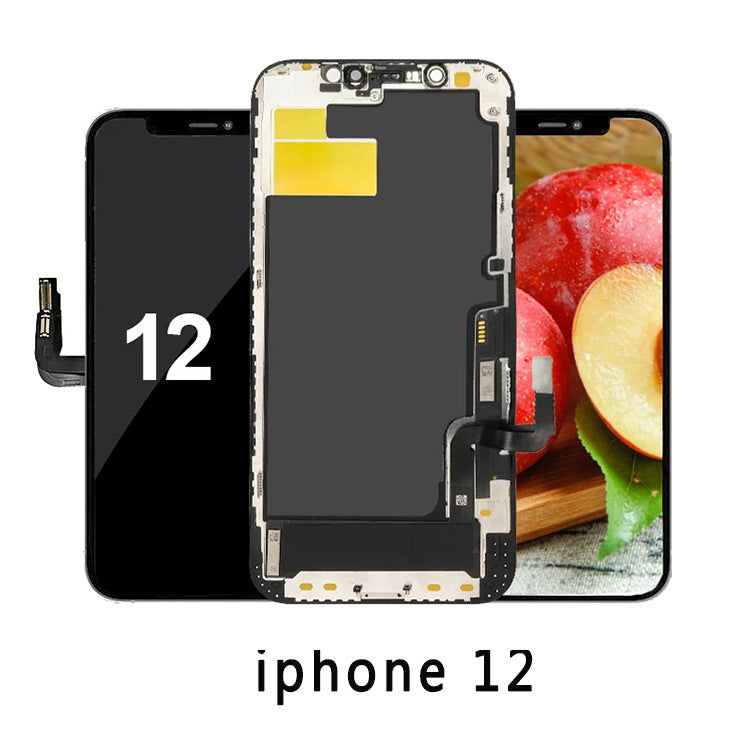
説明
iPhone 12 / 12 Pro 用交換用LCDスクリーン – 6.1インチディスプレイアセンブリ
この高品質な交換用LCDスクリーンは、iPhone 12とiPhone 12 Proの両方において、本来の鮮明な画面と優れたタッチ操作性能を復元するように設計されています。ひび割れ、ブラックアウト、または反応しないディスプレイを修理する場合でも、このスクリーンアセンブリは正確なフィット感で信頼性の高いパフォーマンスを提供します。
主な特徴
-
iPhone 12およびiPhone 12 Pro(6.1インチモデルA2172、A2402、A2403、A2404 / A2341、A2406、A2407、A2408)に対応
-
鮮明なディテールと自然な色彩精度を実現する高解像度 LCD パネル
-
シームレスなジェスチャー応答を実現するフル機能のマルチタッチ機能
-
効率的で安定した設置のためにベゼルフレームがあらかじめ取り付けられています
-
Face ID、Haptic Touch、True Tone をサポート(元のコンポーネントの移行が必要)
-
汚れ防止の疎油性ガラスコーティングにより、透明度と耐久性が向上
-
100%新品、出荷前に品質検査済み
技術仕様
-
ディスプレイサイズ: 6.1インチ
-
画面タイプ: LCD (OLED 以外の代替品)
-
解像度: 2532 × 1170 ピクセル、460 ppi
-
明るさ: 屋内でも屋外でもクリアな視認性を実現する高輝度
-
タッチレスポンス: 正確な静電容量式マルチタッチ入力
-
色域: バランスの取れたコントラストを備えた広い色域
-
パッケージ内容: LCDスクリーンアセンブリのみ
インストールガイドライン
これは交換部品のみであり、フロントカメラ、Face IDセンサー、イヤピーススピーカーは含まれていません。これらは元の画面から移植する必要があります。現代のiPhone部品には高い精度が求められるため、専門家による取り付けを強くお勧めします。
互換性リスト
互換性のあるバッテリー部品番号
配送方法
| 配送方法 | 送り先 | 配送予定時間 | 送料 |
|---|---|---|---|
| USPS/DHL | アメリカ合衆国 | 10~15営業日 | 無料 |
| ローカルキャリア | カナダ/メキシコ | 10~15営業日 | 5.99ドル |
| ローカルキャリア | 東南アジア/東アジア | 5~10営業日 | 無料 |
| DHLパケット | ヨーロッパ諸国 | 16~20営業日 | 7.99ドルから |
| ローカルキャリア | UAE/サウジアラビア/イスラエル | 16~20営業日 | 7.99ドルから |
支払い方法
| ペイパル |

お支払いは迅速、安全、便利です。 |
| クレジットカード |

VISA、MasterCard、American Express、JCBなどの主要な国際クレジットカード。 |
| 微信ペイ |

現在、QRコード決済のみに対応しています。WeChatカスタマーサービスにご連絡いただき、WeChatアプリでQRコードをスキャンしてお支払いを完了してください。 |
| Googleペイ |
より便利で速い Google Pay でお支払いください。 |
| アップルペイ |
Appleデバイスをご利用の場合は、Apple Payを使ってお支払いいただけます。より便利で、より早くお支払いいただけます。 |
| 銀行振込 | 上記の支払い方法をご利用いただけず、注文金額が HK$2000 を超える場合は、カスタマー サービスにご連絡の上、銀行口座を取得して銀行振込でお支払いください。 |
すべての支払い方法はそれぞれのプラットフォームによって保証されており、支払いプロセス中に入力するアカウント情報は当社のウェブサイトのサーバーを経由しません。
品質保証
One-year warranty
Within one year from the date of purchase, if you use the iPhone 12/12pro用交換用LCDスクリーン battery normally and find that the product itself has quality problems and it is within the normal warranty range, you can contact our customer service. After our confirmation, we will provide you with repair or replacement services.返品・交換
お客様のご満足は私たちにとって非常に重要です。15日間の満足保証期間を設けております。保証条件に基づき、当ウェブサイトでご購入いただいた商品は交換または返金いたします。
返金
ご注文いただいた商品が間違っていた場合、またはご注文後24時間以内にご購入いただけなかった場合は、速やかにカスタマーサービスまでご連絡ください。倉庫からの発送が完了していない場合は、直接返金をご依頼いただければ、全額返金いたします。
交換
保証のお約束として、交換をご依頼いただければ、返品された商品を受領後、正しい新しい商品を再送いたします。
返品と返金
倉庫が最近製品を発送または受領した場合は、返品と返金を依頼できます。返品を保証された製品を受け取った後、全額を返金いたします。
ヒント:
1.返品または交換をする前に、必ずカスタマーサービスに連絡して返品を申請してください。そうでない場合、返品は受け付けられません。
2.交換・返金の際には、商品の返送料をご負担いただく場合がございます。ただし、商品自体に品質上の問題がある場合や、弊社が誤った商品を発送した場合を除き、返送料は弊社が負担いたします。
Q&A
- Q: How do I check if this iPhone 12/12pro用交換用LCDスクリーン is compatible with my laptop?1.Find the "Model Name" label below the front keyboard of the laptop (some are on the back) or the "Battery Model" label on the battery, and then check if there is that model on this website's product compatibility list.
2.Compare the voltage and capacity of your original iPhone 12/12pro用交換用LCDスクリーン with ours, and then look at our product pictures to see if the interface and overall shape are the same.
3.If you have any questions, you can always "Contact Us" or click "How to find the right battery?" - Q: How do I charge the iPhone 12/12pro用交換用LCDスクリーン correctly?Since current lithium-ion batteries have no memory effect, there is no need to charge a new iPhone 12/12pro用交換用LCDスクリーン for 12 hours or even longer when you use it for the first time, just fully charge it.
When the laptop is connected to an external power source, the battery will no longer charge or discharge after it is fully charged, and will continue to be powered by the external power source. If you frequently use an external power source, disconnect the external power source from the battery several times a week to help extend the life of the iPhone 12/12pro用交換用LCDスクリーン.
It should be noted that when using battery power, you should try to avoid running out of battery power. When the remaining power is 10%, an external power source must be connected. - Q: How should I take care of my iPhone 12/12pro用交換用LCDスクリーン on a daily basis?1.Avoid completely draining the battery.
2.Set the laptop's power options to "Energy Saving".
3.Close some unnecessary power-consuming applications.
4.Reduce the display brightness as much as possible.
5.When the outside temperature is too high, such as when running large applications, a radiator should be used to accelerate heat dissipation.
6.If the laptop is not used for a long time, the battery should be charged and discharged once a month and placed in a cool and dry place.